
Title –Super 9 Color (スーパー9カラー)
System –Family Basic 2.1 (3.0 with correction)
Author – Unknown
Publication – 任天堂 ファミリーコンピュータ ファミリーベーシック PERFECT BOOK (Nintendo Family Computer and Family Basic Perfect Book)
Page Scans – 1 2 3 4
Preserved By – ozidual
Recommended Emulator – VirtualNES
/Capture.PNG)
Article Translation:
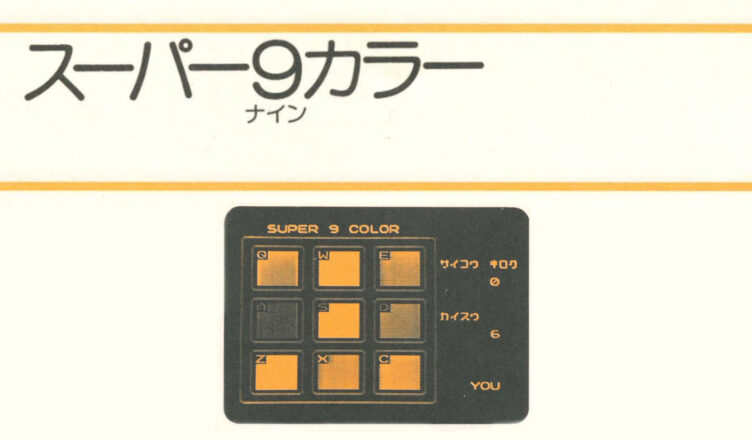
There are a total of nine (3×3) squares on the screen, each of which is a different color. First “COM” will be displayed in the bottom right corner of the screen. The computer will randomly select one of these nine colors, make a sound and flash the color. Then “YOU” will be displayed in the bottom right corner of the screen, press the corresponding key Q W E A S D Z X C.
If the key you pressed is correct, the computer will select another random key and play a sound and flash a color after the first key you selected. Press the keys just as the computer did before. If the key you pressed is correct, another random key will be added.
In this way, the computer will choose a random color one by one, increasing the number up to a maximum of 30. The pattern changes every time you play the game, so you will have to rely on your memory. If you do not press the keys as the computer does, a buzzer will sound and the game will end. “TRY AGAIN?” will be displayed on the screen, so if you want to play again, press any key other than “N”, and then press the return key. Your high score will be recorded and the game will start again.
The program is low on memory so please do not modify or add anything to it.
Program Description:
10 – Intial settings for screens and variables
20 – Declaration of array variables
25-26 – Load color and sound data into variables
30 – Compositing with background, initial variable settings
35-50 – Change the color combination of the palette color number
60-140 – Change the color of the grid on the screen
150-160 – Displaying scores and high scores
260 – Randomly determine the position
265 – “COM” display
270-330 – Computer side sound output and color flashing
340 – Display of “YOU”
350-460 – Judgement based on key input
470 – Sound and color flashing when key is pressed
480 – Determining whether the pattern has been cleared
490 – End of routine
500 – Determining whether key input is correct
510-560 – Sound and color flashing subroutine
600-630 – Game end processing
800-810 – Color and Sound data
Code:
10 CLS:CGSET1,1:SPRITE ON:PLAY”T3″:HI=0
20 DIM X(30),Y(30),C(2,2),M$(2,2),F(2,2)
25 FOR I=0 TO 2:FOR J=0 TO 2:READ C(I,J):F(I,J)=C(I,J):NEXT:NEXT
26 FOR I=0 TO 2:FOR J=0 TO 2:READ M$(I,J):NEXT:NEXT
30 VIEW:SC=0:T=100:E=-1:D=0
35 FOR I=0 TO 2
40 PALETB I+1,15,C(I,0),C(I,1),C(I,2)
50 NEXT
60 FOR I=0 TO 2
80 FOR J=0 TO 2
90 COLOR 2+6*J,3+6*I,I+1
100 COLOR 4+6*J,3+6*I,I+1
110 COLOR 2+6*J,6+6*I,I+1
120 COLOR 4+6*J,6+6*I,I+1
130 NEXT
140 NEXT
150 LOCATE 3,0:PRINT”SUPER 9 COLOR”
160 LOCATE 20,4:PRINT”サイコウ キロク”:LOCATE 24,6:PRINT HI:LOCATE 20,10:PRINT”カイスウ”:LOCATE 24,12:PRINT SC
260 X(D)=RND(3):Y(D)=RND(3)
265 LOCATE 23,18:PRINT”COM”:PAUSE 100
270 FOR I=0 TO D
280 Z=X(I):W=Y(I):GOSUB 510
330 NEXT
340 D=D+1:LOCATE 23,18:PRINT”YOU”
350 K$=INKEY$
360 IF K$=”Q” THEN A=0:B=0
370 IF K$=”W” THEN A=0:B=1
380 IF K$=”E” THEN A=0:B=2
390 IF K$=”A” THEN A=1:B=0
400 IF K$=”S” THEN A=1:B=1
410 IF K$=”D” THEN A=1:B=2
420 IF K$=”Z” THEN A=2:B=0
430 IF K$=”X” THEN A=2:B=1
450 IF K$=”C” THEN A=2:B=2
460 IF K$=”” THEN 350
470 E=E+1:Z=A:W=B:GOSUB 500
480 IF D=E+1 THEN E=-1:SC=SC+1:GOTO 160
490 GOTO 350
500 IF A<>X(E) OR B<>Y(E) THEN 600
510 F(Z,W)=13
520 PALETB Z+1,15,F(Z,0),F(Z,1),F(Z,2)
530 PLAY M$(Z,W)
540 F(Z,W)=C(Z,W)
550 PALETB Z+1,15,F(Z,0),F(Z,1),F(Z,2)
560 RETURN
600 PLAY”O1C9″:CLS:LOCATE 8,10:INPUT”TRY AGAIN”;T$
610 IF SC>HI THEN HI=SC
620 IF T$<>”N” THEN 30
630 CLS:CGSET 1,1:END
800 DATA 41,39,28,26,48,22,37,17,20
810 DATA O2C3,O2D3,O2E3,O2F3,O2G3,O2A3,O2B3,O3C3,O3D3
Correction to work in Family Basic V3.0





/Family%20Computer%20and%20Family%20Basic%20Perfect%20Book%20(J%20OCR)_0157.jpg)
/Family%20Computer%20and%20Family%20Basic%20Perfect%20Book%20(J%20OCR)_0158.jpg)
/Family%20Computer%20and%20Family%20Basic%20Perfect%20Book%20(J%20OCR)_0159.jpg)
/Family%20Computer%20and%20Family%20Basic%20Perfect%20Book%20(J%20OCR)_0160.jpg)