
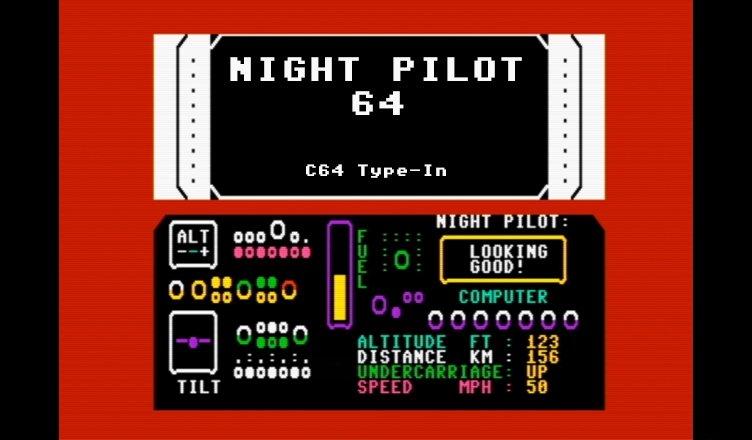
Title – Night Pilot 64
System – Commodore 64
Author – William Fong
Publication – Commodore Horizons, Issue 8, August 1984
Page Scans – 1 2 3
Preserved by – eboy71
Recommended Emulator – VICE
/Night-Pilot-Screenshot1.png)
/Night-Pilot-Screenshot2.png)
/Night-Pilot-Screenshot3.png)
Loading the Game –
- Mount the disk image (1984-08 Night Pilot.d64) in your emulator. In VICE, this is done by selecting File → Attach Disk Image
- Load the app by typing LOAD”NIGHT PILOT”,8
- Once loaded, type RUN to start
Article Text & Instructions:
William Fong’s flight simulator program represents a light plane coming in to land from 3500 feet, hampered by total darkness.
You’ll need plenty of practice before you’re able to control the plane. Try to level out at a fairly high altitude and start a gentle descent.
Keep an eye on the altimeter and use W for up and X for down. The first press will level you out, the second will change your altitude one way or another.
Also keep an eye on TILT. Press A to tilt left and D for right. It’s particularly important to stay on an even keel when you’re nearing a runway.
Speed is controlled by + and – in increments of five units. Left to itself, speed will decrease by one MPH per second.
DISTANCE is the distance to the middle of the runway. For a visual display of position, press F3, to return to the cockpit display press F1.
Lower the undercarriage with the space bar to land. A beep will be heard if speed or fuel is too low.
If you hear no engine noise when the program is RUN, press RUN/STOP, enter GOTO 6000 and press “Y” when asked. Repeat if necessary.
Editor’s Note:
- Interestingly, this type-in appears suspiciously similar to “Flight Simulator”, a type-in game published in the “Commodore 64: Games Book“, which was published by Melbourne House in 1983. In fact, “suspiciously similar” is probably underselling just how close it is; it’s practically identical.
- William Fong is credited with multiple games in addition to Night Pilot. You can check them out here.


/Commodore-Horizons-1984-08-p30.png)
/Commodore-Horizons-1984-08-p31.png)
/Commodore-Horizons-1984-08-p33.png)