
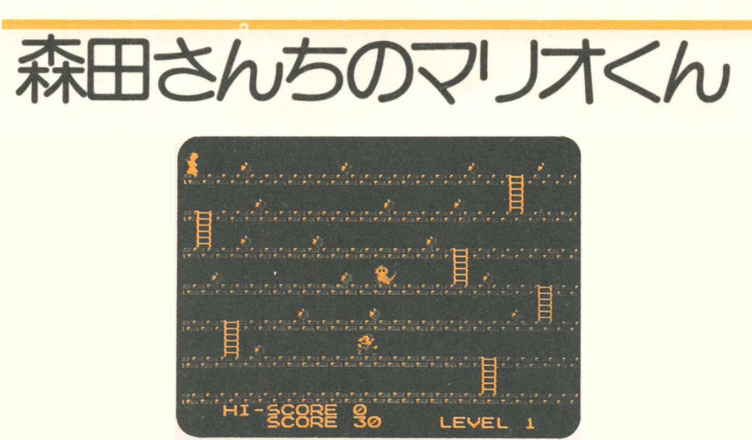
Title –Morita’s Mario (森田さんちのマリオ)
System – Nintendo Family BASIC
Author – Unknown
Publication –任天堂 ファミリーコンピュータ ファミリーベーシック PERFECT BOOK (Nintendo Family Computer and Family Basic Perfect Book)
Page Scans – 1 2 3 4
Preserved By – ozidual
Recommended Emulator – VirtualNES
/Game%205%20BG%20(Basic%2023)%20(English%20and%20Japanese).PNG)
Translated Article:
Mario is on the first floor of the building, so use the controller to pick up the apples that have fallen and bring them to the lady on the seventh floor.
You can pick up as many apples as you like, each worth 10 points, but if you don’t get them all before the Fireball on the first floor reaches the Lady on the seventh floor, the game will be over.
On either side of the screen are warp tunnels that allow Mario to emerge on the other side, but he must use ladders to reach the upper levels.
You can also change the position of the apples and ladders to create your own level.
Program Description:
10 Clear screen, initial screen settings, clear high score
12-15 – Variable initial settings, screen composition
20 – Set Mario character
22 – High score display
25 – Display of score and level
100 – Show Mario
112 – When Mario reaches the left edge of the screen, go to line 400
115 – Game over descision
120 – Processing when left on Controller I is pressed
130 – Processing when right on Controller I is pressed
133 – Convert Mario’s position to the BG GRAPHIC screen
134 – Determine if there is a ladder at Mario’s position
135 – Processing when up on Controller I is pressed
140 – Convert Mario’s position to the BG GRAPHIC screen
150 – Determine if there is an apple at Mario’s position
160 – Determine if there is a ladder at Mario’s position
170 – end of routine
180 – Move Mario upwards
190 – If the action is not completed, go to line 190
200 – End of routine
210 – Addition and display of scores
300 – Judging and displaying high scores
305-310 – Game over display
320 – Viewing and processing replays
330 – Program termination processing
400-420 – Processing when clearing a level
Code:
10 CLS:CGSET1,0:SPRITEON:HS=0
12 L=5:LE=1:SC=0
15 MX=10:MY=168:M=1:FY=192:VIEW:PLAY”O5T1:T1:T1″
20 DEFMOVE(0)=SPRITE(0,7,1,3,0,0):DEFMOVE(1)=SPRITE(0,3,1,3,0,0):DEFMOVE(2)=SPRITE(0,1,1,12,0,0)
22 LOCATE 3,21:PRINT”HI-SCORE”;HS;
25 LOCATE 6,22:PRINT”SCORE”;SC;:LOCATE18,22:PRINT”LEVEL”;LE;
30 DEFMOVE(3)=SPRITE(5,7,L,120,0,3):DEFSPRITE0,(2,1,0,1,0)=CHR$(33)+CHR$(32)+CHR$(35)+CHR$(34)
100 POSITIONM,MX,MY:MOVEM:SPRITE0,13,24
110 IF MOVE(3)=0 THEN ERA3:FY=FY-24:POSITION3,240,FY:MOVE3
112 IF XPOS(M)<28 AND YPOS(M)=24 THEN 400
115 IF XPOS(3)<24 AND YPOS(3)=24 THEN CUT 3:SPRITE0:GOTO 300
120 IF STICK(0)=1 THEN ERA0,2:POSITION1,XPOS(M), YPOS(M):M=1:MOVEM
130 IF STICK(0)=2 THEN ERA1,2:POSITION0,XPOS(M),YPOS(M):M=0:MOVEM
133 MX=(XPOS(M)-16)/8+1:MY=(YPOS(M)-24)/8+1:IF MX>27 OR MX<0 THEN 170
134 IF SCR$(MX,MY)=CHR$(&HD7) THEN 210
135 IF STICK(0)=8 AND SCR$(MX,MY)=CHR$(&HD2) THEN 160
140 MX=(XPOS(M)-16)/8+1:MY=(YPOS(M)-24)/8+1:IF MX>27 OR MX<0 THEN 200
150 IF SCR$(MX,MY)=CHR$(&HD7) THEN 210
160 IF STICK(0)=8 AND SCR$(MX,MY)=CHR$(&HD2) THEN 180
170 GOTO 110
180 POSITION2,XPOS(M),YPOS(M):ERA0,1:M=2:MOVE2
190 IF MOVE(2) THEN 190
200 GOTO 170
210 LOCATE MX,MY:PRINT” “;:SC=SC+10:PLAY”C0″:LOCATE6,22:PRINT”SCORE”;SC:GOTO 170
300 IF SC>=HS THEN HS=SC:LOCATE 3,21:PRINT”HI-SCORE”;HS;
305 FOR I=0 TO 5:LOCATE 6,9+I:PRINT ” “:NEXT
310 LOCATE 8,10:PRINT “GAME OVER”:LOCATE 8,11
320 LOCATE 7,12:INPUT”TRY AGAIN “;RP$:IF RP$<>”N” THEN 12
330 CGSET 1,1:CLS:END
400 FOR I=0 TO 4:LOCATE 4,9+I:PRINT ” “:NEXT
405 CUT0,1,2,3:LOCATE 6,10:PRINT”LEVEL”;LE;” CLEAR !!”;:PAUSE 200:LE=LE+1:L=L-1:IF L<1 THEN L=1
410 LOCATE 5,12:PRINT”CHALENGE LEVEL”;LE;”!!”:PAUSE 200
420 ERA 0,1,2,3:GOTO 15
Corrections:
Page 160:
(the 0 from the GOTO 170 accidentally ended up in front of the 300 for line 300)
210 LOCATE MX,MY:PRINT” “L:SC=SC+10:PLAY”C0″:LOCATE6,22:PRINT”SCORE”;SC:GOTO 170
300 IF SC>=HS THEN HS=SC:LOCATE 3,21:PRINT”HI-SCORE”;HS;






/Family%20Computer%20and%20Family%20Basic%20Perfect%20Book%20(J%20OCR)_0161.jpg)
/Family%20Computer%20and%20Family%20Basic%20Perfect%20Book%20(J%20OCR)_0162.jpg)
/Family%20Computer%20and%20Family%20Basic%20Perfect%20Book%20(J%20OCR)_0163.jpg)
/Family%20Computer%20and%20Family%20Basic%20Perfect%20Book%20(J%20OCR)_0164.jpg)