
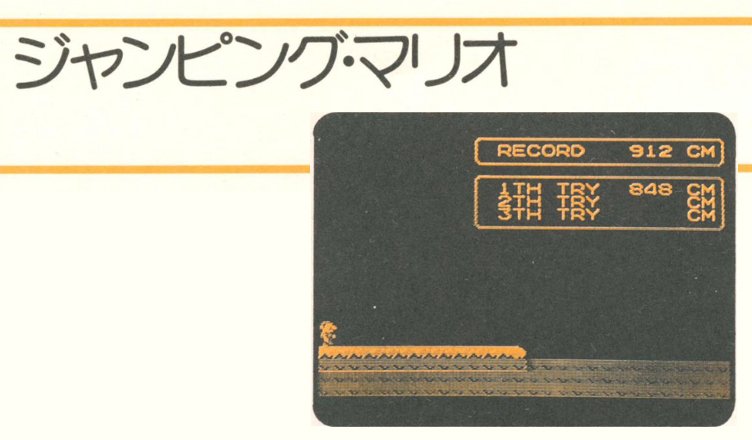
Title –Jumping Mario (ジャンプング マリオ)
System – Nintendo Family BASIC
Author – Unknown
Publication –任天堂 ファミリーコンピュータ ファミリーベーシック PERFECT BOOK (Nintendo Family Computer and Family Basic Perfect Book)
Page Scans – 1 2 3 4
Preserved By – ozidual
Recommended Emulator – VirtualNES
%20(English%20and%20Japanese).PNG)
Translated Article:
This is a game in which Mario, standing on a cliff, jumps off the cliff and competes to see who can jump the farthest.
When you run the program, a whistle will sound to signal the start, so press the A and B buttons on Controller I to start Mario. The more times you press the A and B buttons, the faster Mario will go. When Mario reaches the edge of the cliff, he will jump naturally.
The faster Mario’s running speed is, the further he will fly. In other words, the more times you press the A and B buttons, the farther he will fly.
You can jump a total of three times, and each jump will be displayed on the screen. After you complete your third jump, “PUSH START BOTTON!!” will be displayed on the screen, so if you want to continue playing the game, press the START button on Controller I.
Your best score to date will be displayed where it says “RECORD” on the screen, so compete with others to see who can beat your best without damaging your controller.
Please note that even if you hold down either the A or B button on Controller I, you will not achieve much distance.
Program Description:
10 – Screen initial settings, array variable declaration
20 – Initial setting of variables
30-75 – Character settings
80-120 – Display text on screen
160 – Show Mario on top of a cliff, whistle
170 – Determine if the A button on Controller I is pressed
180-190 – Remove Mario from the cliff and set the initial position
200 – Assign the button state of the controller to K
205-210 – Processing by state of K
220-230 – Mario accelerating in action
240 – Works Mario
250 – Determining if Mario is at the edge of the cliff
260 – end of routing
300-350 – Mario’s Jump (Upward)
360-400 – Mario’s Jump (Down)
410 – Assign score to a variable
430 – Display score
440 – Determine the variables for the next try
450 – Determining whether the three tries are complete
460 – Next try
500-520 – High Score Judgement
530 – 570 – Handling replays
Code:
10 CLS:CGSET1,0:SPRITE ON:VIEW:DIMSC(2)
20 F=0:TI=2000:SP=0
30 DEF MOVE(0)=SPRITE(0,3,4,3,1,0)
40 DEF MOVE(1)=SPRITE(0,2,1,1,1,0)
50 DEF MOVE(2)=SPRITE(0,4,1,1,0,0)
60 DEF MOVE(3)=SPRITE(0,3,3,3,1,0)
65 DEF MOVE(4)=SPRITE(0,3,2,3,1,0)
70 DEF MOVE(5)=SPRITE(0,3,1,3,1,0)
75 DEF SPRITE 0,(0,1,1,1,0)=CHR$(5)+CHR$(4)+CHR$(7)+CHR$(6)
80 FOR I=0 TO 2
90 LOCATE 11,I+4:PRINT I+1;”TH TRY CM”
100 NEXT
110 LOCATE 12,1:PRINT “RECORD CM”
120 LOCATE 20,1:PRINT HI
160 SPRITE 0,12,143:PAUSE 100:PLAY”C6:G6″
170 IF STRIG(0)<>8 THEN 170
180 MOVE 0:SPRITE 0
190 POSITION 0,12,143
200 K=STRIG(0)
205 IF K=4 THEN D=20+A
210 IF K=8 THEN TI=TI-D:D=1
220 IF SP=0 AND TI<1900 THEN POSITION3,XPOS(0),YPOS(0):SP=3:MOVE SP:ERA 0:A=5
225 IF SP=3 AND TI<1700 THEN POSITION4,XPOS(3),YPOS(3):SP=4:MOVE SP:ERA 3:A=20
230 IF SP=4 AND TI<1400 THEN POSITION5,XPOS(4),YPOS(4):SP=5:MOVE SP:ERA 4:A=40
240 MOVE SP
250 IF XPOS(SP)>112 THEN 300
260 GOTO 200
300 ERA SP
310 POSITION 1,XPOS(SP),YPOS(SP)
320 FOR I=0 TO (20-TI/100)*2
330 MOVE 1
340 IF MOVE(1) THEN 340
350 NEXT
360 ERA 1:POSITION 2,XPOS(1),YPOS(1)
370 FOR I=0 TO (20-TI/100)*2+12
380 MOVE 2
390 IF MOVE(2) THEN 390
400 NEXT
410 PAUSE 150:ERA 2:SC(F)=2000-TI
430 LOCATE 20,F+4:PRINT SC(F)
440 F=F+1:TI=2000:SP=0:A=0
450 IF F>2 THEN 500
460 GOTO 160
500 FOR I=0 TO 2
510 IF SC(I)>HI THEN HI=SC(I)
520 NEXT
530 LOCATE 20,1:PRINT HI
540 LOCATE 3,12:PRINT”PUSH START BUTTON !!”:PAUSE 20
550 LOCATE 3,12:PRINT” “:PAUSE 20
560 IF STRIG(0)<>1 THEN 540
570 F=0:GOTO 80






_0153.jpg)
_0154.jpg)
_0155.jpg)
_0156.jpg)