
Title – Defend Base (ディフェンド べース)
System – Nintendo Family BASIC
Author – Unknown
Publication – PERFECT BOOK (Nintendo Family Computer and Family Basic Perfect Book) (任天堂 ファミリーコンピュータ ファミリーベーシック)
Page Scans – 1 2 3 4 5 6
Preserved By – ozidual
Recommended Emulator – VirtualNES
/Game%201%20BG%20(Basic%2019).PNG)
Translated Article:
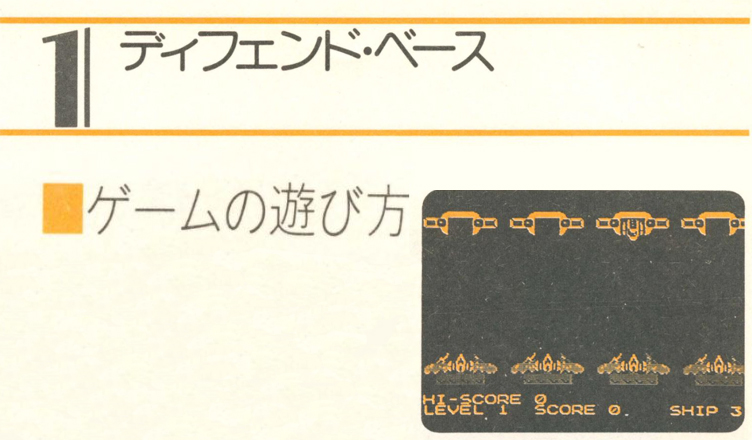
This is a game in which you protect four base starships from UFOs. The starships at the base and the Starkillers that emerge from the UFOs do not have the ability to fly, but they can fire beams. You can protect your startship by firing a beam faster than Starkiller. Fo fire a beam from a starship at the base, use the Z X , / keys, which correspond to the starship at each location.
Starkillers that emerge from UFOs sometimes transform into starships. The starships that emerge do not fire beams, but if you fire a beam at them, one of your spare starships will be removed. If the starship attacks the starship at your base, one of your spare starships will be removed. If you run out of spare starships, the game is over, so fire your beams carefully.
When 10 starkillers or starships emerge from the UFO, your level will increase and the time it takes for Starkiller to fire its beam will decrease. From then on, your level will continue to increase in the same way.
When you first run the program, it will display “PUSH ANY KEY TO START!!”. If you press any key at this point, the game will start.
Also, if the game is over, you can press any key other than N and then press the return key to start the game again.
You can record your high score during the game, so you can compete with your family and friends in terms of reflexes and concentration.
Program Description:
10 – Initial settings for screens and variables
20-40 – Base starship settings
50 – Explosion character settings
60 – Setting of Starkiller emerging fom a UFO
70 – Starship setting emerging from a UFO
80 – Beam Settings
85-87 – Wait before game start
90-120 – Show Basic starships
130 – Set the initial value for clearing the level
135-140 – High scores, scores, levels, preliminary star
150 – Decide which character will appear from the UFO
155 – Judgement of level clear
160 – Determine what character appears from the UFO
170 – Make a character appear from the UFO
190-220 – Determining key input
230-235 – Judgement to let a beam fire from Starkiller based on a timer
240-260 – Shoot a beam from a starship
270-300 – Determining if the beam hit Starkiller
310-315 – Explosion of a character emerging from a UFO
320 – Process when the character that appeared from the UFO is a starship
330-340 – Process when the character emerging from the UFO is Starkiller
400-440 – Processing when clearing a level
500-530 – Starkiller beam firing
540-545 – Starship explosion at base
550-570 – Reduce the number of spare starships and decide whether to call it a game over
600-650 – Handling game overs and replays
Code:
10 CLS:CGSET 1,1:SPRITE ON:VIEW:SI=3:T1=100:T2=100:SC=0:LE=1:PLAY”T1″
20 FOR I=0 TO 3
30 DEF MOVE(I)=SPRITE(9,0,1,1,1,0)
40 NEXT
50 DEF MOVE(4)=SPRITE(10,0,2,4,0,3)
60 DEF SPRITE0,(1,1,1,0,1)=CHR$(162)+CHR$(163)+CHR$(160)+CHR$(161)
70 DEF SPRITE1,(0,1,1,0,1)=CHR$(174)+CHR$(175)+CHR$(172)+CHR$(173)
80 DEF SPRITE2,(3,0,1,0,0)=CHR$(213)
85 LOCATE 2,10:PRINT”PUSH ANY KEY TO START !!”
86 IF INKEY$=”” THEN 86
87 LOCATE 2,10:PRINT” ”
90 FOR I=0 TO 3
100 POSITION I,32+I*56,168
110 MOVE I
120 NEXT
130 K1=10
135 LOCATE 0,22:PRINT”HI-SCORE”;HI
140 LOCATE 0,23:PRINT”LEVEL”;LE;:LOCATE9,23:PRINT”SCORE”;SC;:LOCATE20,23:PRINT”SHIP”;SI;
150 TX=RND(4):F1=RND(4):F2=0:MX=0
155 ERA 4:SPRITE 0:SPRITE 1:IF K1<0 THEN 400
160 IF F1=3 THEN F2=1
170 SPRITE F2,32+TX*56,32:K1=K1-1:PLAY”O5C0″
180 KY$=INKEY$
190 IF KY$=”Z” THEN MX=0:GOTO 240
200 IF KY$=”X” THEN MX=1:GOTO 240
210 IF KY$=”.” THEN MX=2:GOTO 240
220 IF KY$=”/” THEN MX=3:GOTO 240
230 T1=T1-1:IF T1<0 THEN 500
235 GOTO 300
240 FOR MY=160 TO 24 STEP -1
250 SPRITE 2,36+MX*56,MY
260 NEXT
270 IF MX=TX THEN 310
300 GOTO 180
310 POSITION 4,32+TX*56,32:SPRITE F2:MOVE 4:T1=T2
315 IF MOVE(4) THEN 315
320 IF F2=1 THEN SI=SI-1:PLAY”O1C9″:IF SI<0 THEN 600
330 IF F2=0 THEN SC=SC+1*LE
340 GOTO 140
400 LOCATE 6,9:PRINT”CLEAR LEVEL”;LE:LOCATE 5,11:PRINT”TRY NEXT LEVEL !!”:PAUSE 200
410 LOCATE 6,9:PRINT” “:LOCATE5,11:PRINT” ”
420 LE=LE+1
430 T2=T2-10:IF T2<30 THEN TI=30
440 GOTO 130
500 T1=T2:IF F2=1 THEN 150
510 FOR I=24 TO 184
520 SPRITE 2,36+TX*56,I
530 NEXT
540 ERA TX:POSITION 4,32+TX*56,168:MOVE 4:PLAY”O1C9″
545 IF MOVE(4) THEN 545
550 SI=SI-1:IF SI<0 THEN 600
560 MOVE TX
570 GOTO 130
600 LOCATE 9,9:PRINT”GAME OVER”
610 LOCATE 7,11:INPUT”TRY AGAIN “;T$
620 IF SC>HI THEN HI=SC
630 IF T$<>”N” THEN 10
640 CLS:SPRITE OFF
650 END






/Family%20Computer%20and%20Family%20Basic%20Perfect%20Book%20(J%20OCR)_0143.jpg)
/Family%20Computer%20and%20Family%20Basic%20Perfect%20Book%20(J%20OCR)_0144.jpg)
/Family%20Computer%20and%20Family%20Basic%20Perfect%20Book%20(J%20OCR)_0145.jpg)
/Family%20Computer%20and%20Family%20Basic%20Perfect%20Book%20(J%20OCR)_0146.jpg)
/Family%20Computer%20and%20Family%20Basic%20Perfect%20Book%20(J%20OCR)_0147.jpg)
/Family%20Computer%20and%20Family%20Basic%20Perfect%20Book%20(J%20OCR)_0148.jpg)